Guides
Querying data with SPARQL
Querying with SPARQL lets you ask questions about the data in a selected workspace and branch. The examples below use the dataset from the Quickstart.
Read from the right graph
Uploaded data commonly belongs to a named graph. Include its name in your query:
SELECT ?name WHERE {
  GRAPH <https://example.org/quickstart> {
    ?person <https://example.org/name> ?name .
  }
}
ORDER BY ?name
Save this as names.rq. You can format it and check its syntax without
connecting to a workspace:
legra graph format names.rq
legra graph validate names.rq
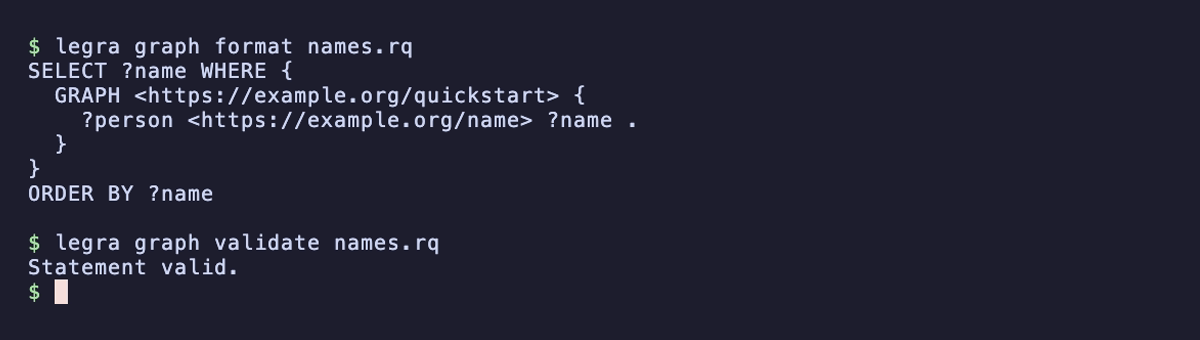
Then run the query:
legra graph query names.rq --branch main --format tsv
To search across named graphs, use a variable for the graph name:
SELECT ?graph ?person ?name WHERE {
  GRAPH ?graph { ?person <https://example.org/name> ?name }
}
LIMIT 50
A pattern without GRAPH reads the default graph. It does not automatically
include every named graph. If results are empty, check the workspace, branch,
and graph selection before changing your query.
Test whether a fact exists
ASK returns a boolean result:
ASK WHERE {
  GRAPH <https://example.org/quickstart> {
    <https://example.org/alice> <https://example.org/knows> <https://example.org/bob>
  }
}
Produce graph results
CONSTRUCT describes the triples you want to return from matching data:
CONSTRUCT { ?person <https://example.org/label> ?name }
WHERE {
  GRAPH <https://example.org/quickstart> {
    ?person <https://example.org/name> ?name
  }
}
For RDF response formats and Accept headers, use the
HTTP API. DESCRIBE requests a description of a resource;
it is not a workspace export.
Locate a syntax error
If validation reports an error, use the line and column to find it in your query file. This example is missing the object of a pattern; adding it makes the statement valid:
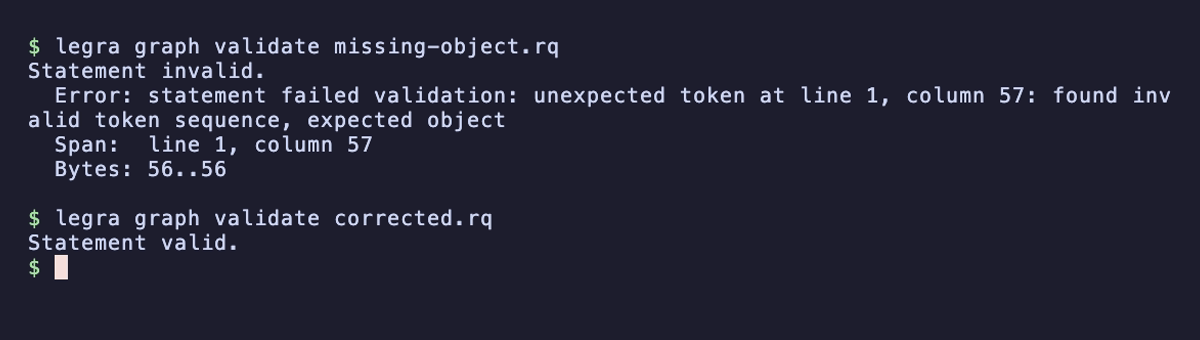
The validation example includes the incomplete query and its correction.
Choose output and execution mode
The CLI supports JSON and TSV query results. Use a file for longer statements. Long-running queries can be submitted asynchronously and followed through Tasks.
Use Update for data changes and
Branching to review those changes separately from main.